MCP tools tell an AI agent what it can call. Agent Skills tell it how to do the work—packaging a SKILL.md operating guide with YAML frontmatter alongside reference docs, templates, and supporting files.
Until recently, distributing skills across a team meant copying folders onto every developer’s machine, duplicating files across repositories, or stuffing long procedural instructions into tool descriptions or the server’s instructions field. That leads to version drift, manual maintenance, and bloated context windows.
The Model Context Protocol’s SEP-2640: Skills Extension (io.modelcontextprotocol/skills) solves this at the protocol layer by letting MCP servers publish Agent Skills directly alongside their tools. Starting in MCPHub v1.3.0 (PR #1508), self-hosted MCPHub gateways can import, inspect, and publish multi-file Agent Skills over your existing MCP endpoints.
What SEP-2640 brings to MCP
Rather than inventing a separate delivery mechanism or installing files onto the agent’s local machine, SEP-2640 builds on MCP’s existing Resources primitive (on MCP 2026-07-28) and preserves Agent Skills’ progressive disclosure model.
During discovery, a server signals support by advertising both resources and the io.modelcontextprotocol/skills extension capability:
{
  "capabilities": {
    "resources": {},
    "extensions": {
      "io.modelcontextprotocol/skills": {}
    }
  }
}
From there, compatible clients interact with skills in three lightweight stages:
- Discover (
skills/list) — Enumerates available skills in paginated batches. Each entry returns itsskill://URI, parsed YAMLfrontmatter(name,description, and custom metadata), and aresourcesmanifest listing every file’s URI, byte size, and SHA-256 digest. Agents inspect lightweight metadata first instead of loading every document into the prompt upfront. - Refresh (
skills/get) — Fetches a single skill entry and its manifest by URI so a client can refresh metadata or verify updates before reading files. - Read on demand (
resources/read) — LoadsSKILL.mdand supporting files (UTF-8 text or base64-encoded binary attachments) lazily only when the task needs them, checking content against the manifest’s size andsha256:digest.
Progressive disclosure has a budget: only name and description stay in context (about 100 tokens), the SKILL.md body loads when a skill is activated (under 5,000 tokens and 500 lines is recommended), and supporting files are read only on demand. SEP-2640’s motivation offers a concrete example: an 875-line mcpGraph skill does not fit in the instructions field returned by server/discover.
A typical skills/list response from MCPHub looks like this:
{
  "resultType": "complete",
  "skills": [
    {
      "uri": "skill://mcphub/33333333-3333-4333-8333-333333333333/release-checklist/SKILL.md",
      "frontmatter": {
        "name": "release-checklist",
        "description": "Verify release notes, changelogs, and deployment checks before tagging."
      },
      "resources": [
        {
          "uri": "skill://mcphub/33333333-3333-4333-8333-333333333333/release-checklist/SKILL.md",
          "size": 1842,
          "digest": "sha256:..."
        },
        {
          "uri": "skill://mcphub/33333333-3333-4333-8333-333333333333/release-checklist/references/checklist.md",
          "size": 4210,
          "digest": "sha256:..."
        }
      ]
    }
  ],
  "ttlMs": 0,
  "cacheScope": "private"
}
Because the client reads files directly over MCP, nothing is installed into the agent’s local environment. Skills share the same authentication and routing as the tools they accompany, but the spec requires hosts to treat them as a higher-risk surface: a skill can carry server-authored files and instruct the model to run them with local tools, so a shared transport is not the same as equal trust.
Details that are easy to miss
- Identity is not the name. A skill’s identity is the originating server plus its
skill://URI. The name is a label, and different servers can reuse it. - Dynamic skills.
resourcescan be"dynamic"when content is generated and no stable digests exist; such skills cannot be content-bound, and hosts may decline them. - Listings can be partial.
skills/listis paginated (20 entries per page in MCPHub) and may return a partial catalog;skills/getmust return any skill by URI, and an unknown URI returns-32602. - Directory reads are optional.
resources/directory/readrequires the server to declaredirectoryRead: true; MCPHub does not declare it, so clients should not call it. - Cache hints do not provide integrity.
ttlMsandcacheScopedescribe freshness and sharing, not content integrity; digests still do that job.
Why publish skills through an MCP gateway?
Individual upstream MCP servers usually wrap a single API or data source. They rarely carry your team’s internal runbooks, compliance checklists, or workflows that span multiple servers—like pulling an issue from GitHub, querying internal documentation, and posting a release summary to Slack.
Because MCPHub already sits between AI clients and upstream MCP servers with centralized authentication and group routing, hosting Agent Skills at the gateway layer lets you distribute tools and their operating manuals from one place. Teams connect to the same endpoint they already use and receive the exact skills scoped to their group.
Inside MCPHub’s Skills catalog
MCPHub v1.3.0 introduces an administrator-managed Skills catalog designed around safe ingestion, immutable snapshots, and consistent access control.
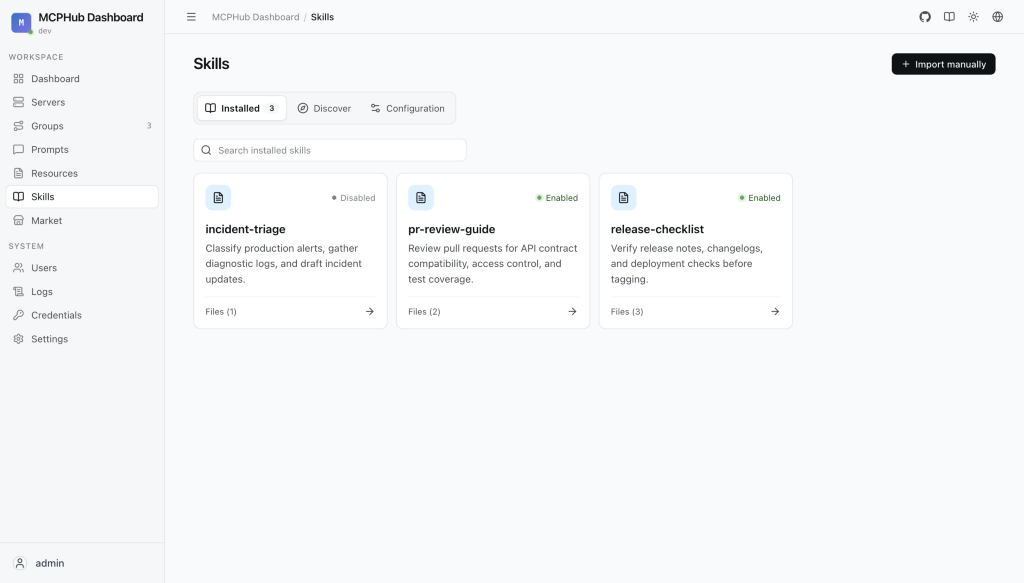
1. Three ways to import skills
In the dashboard under Skills, administrators can bring in multi-file skills from three sources:
- Local directory upload — Upload a folder containing
SKILL.mdand supporting files (up to 512 regular files and 16 MiB total per skill). - Public GitHub directory URL — Point to a repository directory (for example
https://github.com/owner/repo/tree/main/skill-name), a commit SHA, or a branch/tag. - Built-in
skills.shdiscovery — Open Discover to browse the top 20 entries from theskills.shall-time leaderboard or search the public catalog, then import in one click.
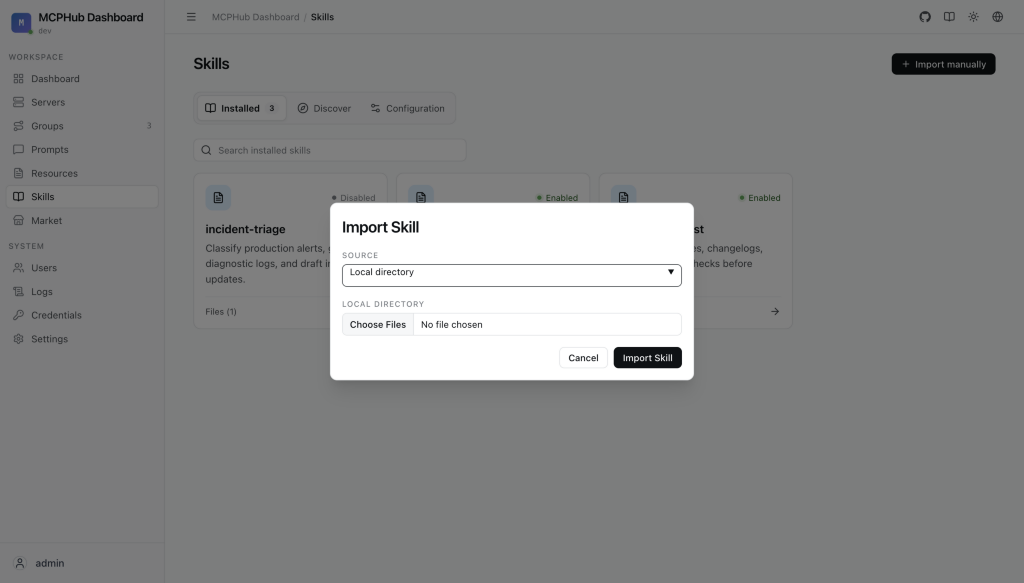
Remote imports from GitHub and skills.sh resolve the source and pin the import to an exact Git commit at import time. If your server runs behind a corporate proxy, Skills → Configuration lets you reuse the server’s HTTPS_PROXY / HTTP_PROXY (honoring NO_PROXY), force a direct connection, or configure a custom HTTP(S) proxy URL for remote imports.
2. Immutable snapshots and built-in inspection
Every imported skill is validated before it enters the catalog: the directory name must match the name field in SKILL.md frontmatter and be unique across the catalog. MCPHub stores each skill as a clean directory under data/skills/<skill-name>/ preserving original relative paths alongside a reserved .mcphub.json metadata file.
Administrators can inspect every file in the dashboard’s built-in file browser—starting with SKILL.md, with previews for Markdown, UTF-8 text, PNG, and JPEG files up to 512 KiB. When an MCP client reads a file over resources/read, MCPHub verifies both byte length and the SHA-256 digest against the stored snapshot before returning content. That only proves the bytes match MCPHub’s snapshot; clients should still retain the manifest and verify reads themselves.
3. Scoped publication and unified access control
Newly imported skills start disabled so administrators can review contents before exposing them. From the skill’s detail page, you can enable it and choose where it is published:
- Global endpoint — Exposes the skill on
/mcpwhen global routing is enabled. - Selected groups — Exposes the skill only on those group endpoints (
/mcp/<group>).
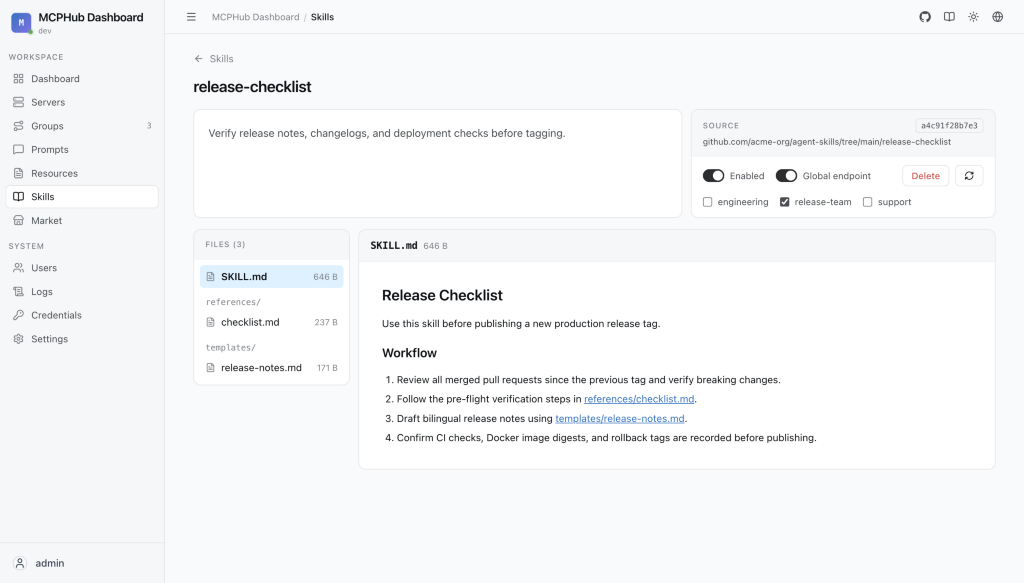
The same route authentication, Bearer token scopes, and group visibility checks (public, group, private) are enforced uniformly across skills/list, skills/get, and direct resources/read calls. A caller without access to a group cannot bypass discovery by guessing a skill:// URI. Responses also set ttlMs: 0 and cacheScope: "private", so disabling or re-scoping a skill takes effect immediately.
Security and trust: digests prove consistency, not safety
SEP-2640 treats MCP-served skill content as untrusted input: a skill is server-authored instructions that may contain prompt injection or tell the model to write files and invoke local tools. The spec is explicit that a manifest’s SHA-256 digests prove only that the bytes a client received match the listing the server published. Digests say nothing about whether the content is trustworthy: any intermediary on the path, including a gateway, can rewrite both together. A skill’s name is not its identity either, since different servers can publish the same name.
MCPHub’s controls are publication-side: skills start disabled and require an administrator’s review; they are stored as immutable snapshots, published to selected groups, verified by size and digest on read, and can be unpublished immediately. Those controls answer “who can publish what, where” and “did the bytes arrive intact”, not “is this skill safe”. In practice:
- Treat a skill like code: pin the commit, read the diff, and import only from sources you trust.
- Pilot in an isolated group before exposing a skill on
/mcp. - Be wary of skills that write files or invoke local commands; execution grants on the client side should be confirmed per skill by the end user.
- Do not read the skills.sh leaderboard as a security endorsement.
For the full approval, origin, and cache rules, see the specification’s security considerations.
Getting started in four steps
- Open the Skills catalog: Sign in to the MCPHub dashboard as an administrator and open Skills (which opens on Installed by default).
- Import a skill: Click Import manually to upload a local folder or paste a GitHub /
skills.shURL, or switch to Discover to search and import from theskills.shcatalog. - Inspect and publish: Click the installed skill to review
SKILL.mdand its attachments, turn on Enabled, and select Global endpoint and/or specific Groups. Publication changes save automatically. - Connect a compatible client: Point a client that supports the MCP Skills Extension on MCP
2026-07-28at your published endpoint (/mcpor/mcp/<group>).
SEP-2640 is now Final, maintained by the Skills Over MCP Working Group. SDK and client support is still rolling out: the TypeScript, C#, Rust, and Ruby SDKs and FastMCP ship the extension (the C# package is experimental), and the Python SDK has merged it but not released it. On the client side, VS Code GitHub Copilot, MCPJam, Archestra, mcpc, Glean, and mcp-use support skills; ChatGPT and others are partial. Check the client support matrix before you wire one up.
If you use the official TypeScript SDK (v2.4.0 or later), enable automatic protocol version negotiation so the client discovers the 2026-07-28 endpoint, then use SkillsClient from ext/skills to list, read, and verify skills. Creating a bare Client does not load them:
import { Client } from "@modelcontextprotocol/client";
import { SkillsClient } from "@modelcontextprotocol/client/ext/skills";

const client = new Client(
  { name: "my-agent", version: "1.0.0" },
  { versionNegotiation: { mode: "auto" } },
);

// after the client connects
const skills = new SkillsClient(client);
const { skills: entries } = await skills.list();
const manifest = await skills.read(entries[0]); // verifies size, SHA-256, and frontmatter
SkillsClient checks byte size, digest, and frontmatter as it reads and throws SkillVerificationError on a mismatch. Pass skipInvalid: true to the constructor to keep valid entries and collect refused ones in invalid.
Existing tools, prompts, and resources remain available on the exact same endpoint, and legacy MCP clients (such as 2025-11-25) continue working normally without seeing the skills extension.
Operational notes for self-hosting
- Backups and persistence: Include
data/skills/in your backups. When running MCPHub with Docker, mounting/app/datapersists skill directories alongside gateway configuration. - Deployment scope: The Skills catalog is supported on single-instance self-hosted MCPHub deployments with either the JSON file or database settings backend.
- Instant unpublishing: Turn off Enabled or delete a skill in the dashboard to immediately take it off all published endpoints.
Next steps
Read the full Skills over MCP documentation for configuration details, the extension overview and SEP-2640 for the protocol, the client support matrix for host coverage, and the TypeScript SDK skills guide for a worked client. If you are new to MCPHub, start with What Is an MCP Gateway? or launch a local instance with the Docker self-hosting tutorial.